
Free ANSYS Tutorial – ANSYS meshing course for beginner and intermediate levels
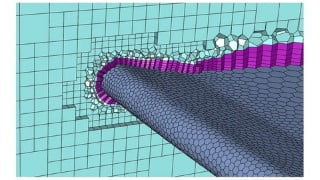

Learn how to generate high-quality mesh for CFD works with ANSYS Meshing Training Course. This practical course covers different mesh types and methods, sizing techniques, mesh tools, and advanced strategies. Become a Meshing expert and earn ANSYS Meshing Certification. Suitable for users of ANSYS software.
ANSYS Meshing Training Course
ANSYS Meshing is one of the grid generation software provided by ANSYS Company. This software includes advanced mesh generation as well as mesh diagnostics and repair functions useful for in-depth analysis.
It offers mesh generation with the capacity to compute meshes with various different structures depending on the user’s requirements. It is a powerful and highly manipulative software that allows the user to generate grids of high resolution. After passing this ANSYS Meshing Training Course, you are ready to claim yourself as a Meshing expert.
What do you learn in this training course?
In this course, you will thoroughly learn how to mesh a 2D/3D geometry model to be used for your CFD/structural simulation stage. Namely, different types of mesh/grids including, unstructured, hybrid, structured, and multiple ways how to carry each out are illustrated.
You will be first familiarized with different types of mesh and the geometries over which these specific mesh types are applied. Then building upon that knowledge, we will teach you the tricks and tips on how to create the mentioned mesh or grids.
This course is presented so that it is as practical as possible so that the graduates after the end of the Training Course can work well with this software to generate high-quality mesh for the geometries required for CFD works.
Training Course Syllabus
This Course contains 24 video lessons and a final project as an exam to get the ANSYS Meshing Certification.
This course is divided into five main lessons and some sub-lessons. You strongly recommend that you do not skip any of the sections even if you feel you know the content.
Chapter 1: Introduction & Global Settings
In this chapter, first, we will introduce the ANSYS Meshing software work environment. Then, we will investigate the structured and unstructured grids. Then you will be familiarized with global settings in ANSYS Meshing software including adaptive&non-adaptive, examine the quality of the generated mesh, and capture curvature/proximity and inflation.
Chapter 2: Mesh Generation Methods
Generally, in this chapter, you will learn about different types of mesh generation. Mesh types such as tetrahedron, hex-dominant, sweep, multizone, cartesian, and layered tetrahedron, and how to create these methods.
Chapter 3: Sizing
This chapter aims to introduce sizing methods. Sizing methods contain vertex sizing ( sphere of influence method), edge sizing ( bias option), face sizing, and body sizing (body of influence method).
Chapter 4: Mesh Tools
In this chapter, you will continue to learn about some mesh tools like contact sizing, refinement option, face meshing, mesh copy, match copy, pinch, and inflation option.
Chapter 5: Advanced Meshing
In this chapter, you will learn some advanced strategies to create structured mesh over complex geometries alongside creating a hybrid mesh. In this chapter, you will get familiar with structured O-grid mesh in cylindrical geometries, structured C-grid mesh for airfoils, and Hybrid mesh type for geometries containing both solid and fluid domains.
Who this course is for:
- ANSYS software
User Reviews
Be the first to review “Free ANSYS Tutorial – ANSYS meshing course for beginner and intermediate levels”
You must be logged in to post a review.



There are no reviews yet.