
Mechanical Engineering Tools
Course facts
- Payment: Free, no certificate
- Credits: Non Credit
- Learning style: Self-paced, start anytime
- Resources: Image Gallery; Programming Assignments
MIT OpenCourseWare details
- As taught in: January IAP 2004
- Department: Mechanical Engineering

| Course Details | ||||||
|---|---|---|---|---|---|---|
|
||||||
| Outcomes | ||||||
|
||||||
| Price & Terms | ||||||
|
||||||
| Technical | ||||||
|
||||||
| Specification | ||||||
|
||||||

Ten days of MATLAB and machine shop basics, ending with a working Stirling engine and a race, with self-guided tutorials and an image gallery.
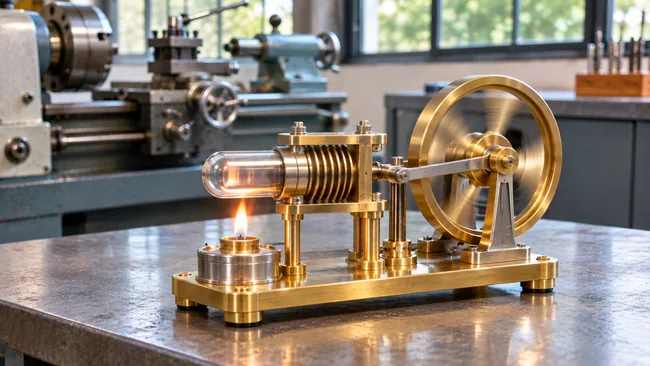
In ten intense January days, students learn their way around both computing tools and metal-cutting tools, and each builds a working Stirling engine. The first three days teach numerical problem solving on mechanical problems. The rest are spent on the bandsaw, milling machine and lathe, leading up to a race and a craftsmanship contest.
What You Will Achieve
- Use MATLAB to solve and graph mechanical problems
- Solve a first order cooling equation and a second order oscillator numerically
- Work safely with a bandsaw, milling machine and lathe
- Build a working Stirling engine
Program Overview
MATLAB Lectures and Tutorial
Three days cover computation, with tutorials to follow on your own.
- Force to displacement matrix
- Second order forced oscillator
- First order cooling equation
Designing and Building Stirling Engines
Six days go to making parts.
- Designing and building your Stirling engines
- Bandsaw
- Milling machine
- Lathe
Spin-Off
The final day puts the engines in competition.
- Craftsmanship contest
- Stock engine race
- Modified engine race
Course Completion
Job Outlook
These basics lead into mechanical engineering study, prototyping and hands-on design work.
Good for: New mechanical engineering students, and teachers looking for a model of an intensive build-it class.
Keep in mind: From January 2004. The engine building needs a machine shop and supervision that the page cannot supply, and no engine plans are listed. MATLAB tutorials are what you can use right away.
Bottom line: An energetic class format worth copying; on your own, the MATLAB tutorials are the main takeaway.
Frequently Asked Questions
What are the MATLAB problems about?
Mechanical ones: a force to displacement matrix for lifting with air cylinders, plus cooling and oscillator equations solved numerically and graphed.
What happens at the spin-off?
A craftsmanship contest, a stock engine race and a modified engine race, with students voting on the most pleasing modifications.
Can I work through the MATLAB parts alone?
Yes. Self-guided tutorials are provided for all three problem sets, and the third day had no lecture because students worked independently.


There are no reviews yet.