
Blender Fundamentals – Modeling

Learn how to use Blender3D ModelingMesh editing tools to create game assets. Perfect for beginners and experienced artists. Join now!
What you’ll learn
- How to use Blender
- 3D Modeling
- Mesh editing tools for creating game assets
- Blender modifiers
Do you want to make 3D game assets for your own games? Perhaps you want to make animated cinematic scenes. If you’ve been wanting to get into 3D modeling in Blender, this is the perfect course.
I assume you have absolutely zero knowledge or experience in Blender, and we take it from the absolute basics. You’ll learn the most important mesh editing tools and modifiers, and throughout the course you’ll be challenged to make your own creations to apply the knowledge you’ve learned.
Each video has a mini-challenge, and I work through the solution as well.
Each section has a section challenge, which is more ambitious. I still work through the solution!
The end of the course challenge puts all of your skills to use, creating a full weapon asset!
In this course, you will learn:
Maneuvering in the Viewport
How Objects are used in Blender, including meshes, lights, and camera
How to use the 3D Cursor in various ways
How to edit a mesh in Edit mode vs. Object Mode
Loop Selection
Fill
Extrude
Proportional Editing
Transform Pivot Point changing
Inset
Bevel
Loop Cut
Knife Tool
Slide edges and vertices
Dissolve
Shade Smooth and auto smooth
Using reference images and sorting objects into Collections
Subdivision Surface Modifier
Solidify Modifier
Bevel Modifier
Mirror Modifier
Screw Modifier
The importance and consequences of applying scale
Shrinkwrap Modifier
Array Modifier
Boolean Modifier
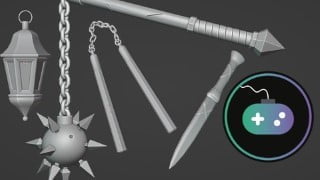
Creation of many different mini projects, including a dagger, pot, sword, treasure chest, flying saucer, lantern, nunchucks, spiked ball and chain mace, and more!
Each lecture is structured so you learn one subject at a time and apply it in a mini challenge before you move on. A PDF cheat sheet of notes is included for the first two sections.
Join an active Discord community where you can talk with other students and game developers and help each other, collaborate, and have a good time!
Who this course is for:
- Beginner artists who want to make 3D art and game assets
- Experienced artists who want a deep-dive on the basics
- Anyone who wants to know how Blender works!
User Reviews
Be the first to review “Blender Fundamentals – Modeling”
You must be logged in to post a review.




There are no reviews yet.