
Color Conversion Techniques for Images using Adobe Photoshop
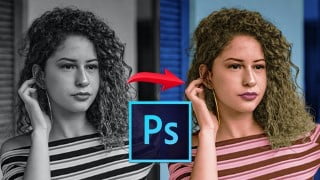

Learn Image Color Conversion Techniques using Adobe Photoshop 2021. This course is perfect for professionals, graphic designers, learners of Adobe Photoshop, and those interested in digital photography and image manipulation. Enhance your skills in color to grayscale image conversion, desaturation, hue and saturation adjustments, and more. With step-by-step video lessons, you’ll gain a solid understanding of Adobe Photoshop’s powerful tools and create stunning digital image color conversions. Perfect for photographers, graphic designers, and anyone interested in learning Adobe Photoshop and manipulation techniques.
What you’ll learn
- Color to Grayscale Image conversion
- Grayscale to Color Image Conversion
- Desaturate
- Hue and Saturation
- Sponge Tool
- Channel Mixer
- Black and White
- Adjustment Layers
- Skin tone creation
- Color the Hair
- Add Color for Cloths
- Colorize the Window and Door
Show moreShow less
Welcome to the course ‘Learn Image Color Conversion Techniques using Adobe Photoshop 2021’. Course, This course was completely focused on image color conversations including color to grayscale image conversion and grayscale to color image conversion which is highly helpful for all professionals, Graphic Designers, Learners of Adobe Photoshop, Print Production, Digital Photography, and Image Manipulation. Adobe Photoshop is one of the best software for Digital Image Editing and Digital Designing.
Adobe Photoshop is a powerful raster graphics software that allows you to create image manipulation artworks. You have a lot of basic features like canvas, layers, brush tool, color palette, color picker, eyedropper tool, and brush palette settings. This course will give you basic knowledge about a digital image color conversion created from beginning to end with step-by-step video lessons. Each video lesson has detailed information about how to use tools and how to construct your digital image color conversion work.
Let us see it in our classes.
This course covers the following lessons:
Desaturate
Hue and Saturation
Sponge Tool
Channel Mixer
Black and White
Adjustment Layers
Skin tone creation
Color the Hair
Add Color for Cloths
Colorize the Window and Door
Add Color for the Wall
Colorize the Ornaments
Add Color for Lips
Nails of the Girl
Eyes of the Girl
Enhance the Skin color
Enhance the Hair color
Enhance the T-Shirt color
Enhance the Wall color
Final Color Enhancements
Who this course is for:
- People who want to learn Adobe Photoshop
- People who want to learn Manipulation
- Photographer
- Graphic Designer
- Freelance Artist
- Any interested learner
User Reviews
Be the first to review “Color Conversion Techniques for Images using Adobe Photoshop”
You must be logged in to post a review.




There are no reviews yet.