
Create a Realistic Looking Desert in Blender
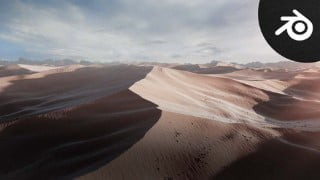

Learn how to create a realistic 3D desert environment in Blender. Master Node workflow, rendering, compositing, and optimization techniques. Perfect for artists looking to enhance their skills.
What you’ll learn
- Learn how to create a fully procedural desert.
- Learn the basics of Node workflow from simple to complex
- Unlock the secret for super realistic render from both Cycles and Eevee
- Learn How to use and composite your renders professionally in Blender powerful Compositor
- All scenes, assets, models, rocks, grass, tree, mountains, textures and more
- Compositing your renders and how to make them look cinematic
- All about nodes from simple shading to advanced procedural shading / Displacement workflows
- All about rendering and how to optimize your scene to get the fastest renders possible
- Creating stunning and unique environments all inside blender
3D environments are one of the most fascinating things in Blender, and in this course, you will create your own 3D desert from scratch in Blender, and Blender only.
Here’s a brief outline of the steps you will take to complete the project
Studying real-life references. It will be our guide to achieving a photorealistic result and understanding the feature that makes a desert looks like an Ocean so that we know exactly what we should create.
How to prepare Blender for the micro-displacement workflow.
Creating the main shapes of the dunes, by using different textures in Blender.
Creating the small waves that are on the surface of the big dunes.
How to frame your shot and create cinematic camera movements.
Creating smaller details on the surface of the sand.
Creating small rocks on the surface of the sand.
Create a Desert shader, and how to make it look realistic. There are many valuable tricks and techniques that you will learn from these videos.
How to light your scene.
How to add background elements without increasing the render time.
How to add realistic sky to the scene.
How to add some dust and atmosphere elements to the scene.
How to break down your scene into different render layers, so that later on you will be able to composite them.
How to optimize the render settings in Blender for fast renders.
How to composite your shot, adjust the colors and lighting, and finally how to save them after finishing the project.
Happy Blending.
Who this course is for:
- This course is meant for artists who wants to take their skills to next level
- Artists interested in creating realistic 3D environments
User Reviews
Be the first to review “Create a Realistic Looking Desert in Blender”
You must be logged in to post a review.



There are no reviews yet.