
Create a Victorian Room with Blender and Substance Painter
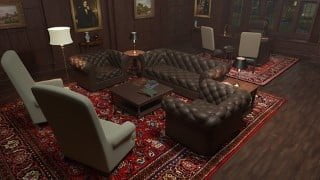

Learn how to create realistic 3D environments for animation and video games using Blender and Substance Painter. Perfect for beginner Blender users.
What you’ll learn
- Model 3D objects in Blender
- Texture 3D models in Substance Painter
- Render an animation using Blender’s Cycles render engine
- Edit a video with Blender’s Video Sequence Editor
In this course you’ll learn how to create a detailed interior scene using tools and techniques that apply equally to both animation and video games. We’ll use Blender to create the 3D models of the furniture, accessories, and the structure of the room. And then we’ll work on UV mapping all of the 3D objects, getting them ready for export, and taking them into Substance Painter for texturing. You’ll learn how to use layer masks in Substance Painter to quickly create realistic textures for your 3D objects.
We’ll set up a Blender export template in Substance Painter, and export our texture maps so that we can use Blender’s Node Wrangler to easily apply the textures to our scene. Next we’ll work on lighting the scene, and rendering using Blender’s Cycles render engine. We’ll animate the camera and use Blender’s Video Sequence Editor to edit our rendered shots together. We’ll even add some music and then render it all out to a single mp4 video file.
If you’re interested in creating environments for animation or video games, then this course is for you. You’ll learn how to create a realistic, detailed scene from the first polygon to the final render. So join me as we “Create a Victorian Room with Blender and Substance Painter.”
Who this course is for:
- Beginner Blender users who would like to learn environment creation.
User Reviews
Be the first to review “Create a Victorian Room with Blender and Substance Painter”
You must be logged in to post a review.





There are no reviews yet.