
Create a Workbook for Your Clients in Canva
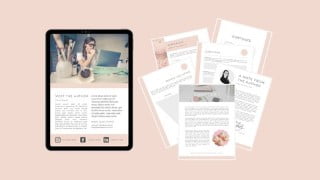

Learn how to create a sleek workbook from scratch and adapt it to your needs with this comprehensive course. Boost your professional image and charge more for your services by creating beautiful workbooks for your clients. No previous experience required, just a free Canva account. Upgrade your online courses, workshops, and programs with this printable workbook. Use PDF Escape to make it fully editable for your clients. Reuse it as many times as you please and become confident in using Canva tools. Perfect for service providers looking to enhance their offerings.
What you’ll learn
- Create a sleek workbook from scratch
- Learn how to adapt the workbook to your needs
- Explore different ways of using your workbook
- Become confident in using Canva tools
Do you want to create a beautiful professionally-looking workbook for your clients so that you can charge more for your services?
If so you are at the right place. I will show you how to create a sleek workbook from scratch so that you don’t have to spend hours trying to figure everything out by yourself.
My name is Mila and I am an English communication coach. I have a 10-week English communication program for recruiters and headhunters, and I’ve created numerous workbooks and guidebooks for my clients.
What do I need before I start?
All you need before you start is a free Canva account. You don’t need to be tech-savvy or have any previous experience with Canva. I’ll walk you through the whole process step by step so that you can follow along.
What can I use this workbook for?
This workbook is great to upgrade your online (and even offline) courses, workshops, programs, and other events. You can always delete the sections that you don’t need or duplicate the pages you like.
Is the workbook printable?
The workbook is fully printable with suitable margins so that your clients can choose how they want to use it.
Is the workbook editable?
No, but you can use PDF Escape – a free program to make it fully editable for your clients. They will be able to fill out the workbook offline.
Do I have to make a new workbook every time I need one?
Not at all. You can reuse it as many times as you please. In my class, I show you how to do it.
Who this course is for:
- Service providers who want to create a beautiful professionally-looking workbook for their clients so that they can charge more for their services.
User Reviews
Be the first to review “Create a Workbook for Your Clients in Canva”
You must be logged in to post a review.





There are no reviews yet.