
Create animated avatars with MASH for Maya
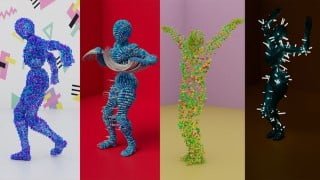

Learn how to generate and use pre-rigged meshes, distribute MASH on a moving mesh, and render complex simulations with Arnold Render in Maya. This course is perfect for beginners to intermediate users of MASH for Maya. Join now and unleash your creativity!
What you’ll learn
- How to generate and use pre-rigged meshes
- How to distribute MASH on a moving Mesh
- Be able to use the Arnold Render to render complex simulation
- Be able to apply the skills learnt on an assignment (at the end of this course)
MASH is a very powerful Motion Graphics and Visual Effects plugin that now ships with Maya. It is a procedural system that allows you to create complex simulations and animations with an easy-to-use interface.
One of the most interesting uses of MASH is how it can be combined with animated meshes. This has been done on multiple occasions in the past few years, most notably in ‘Major Lazers – Light it up’ music video.
This course aims to break down the process of creating highly stylised dynamic simulations based upon motion capture data. However, we won’t be focussing upon any modelling, rigging or dealing with any motion capture data, we will be using pre rigged and animated meshes. This allows us to focus more on the fun stuff (how MASH can be implemented in the workflow).
The only pre-requisite to this course is a basic understanding of navigating Maya. The rest I will teach you from the ground up across 4 different exercises. You will also need an installation of Maya from 2017 onwards.
Course outline
Lesson 1 – Accessing pre-rigged Material (A walkthrough of where to access pre-rigged materials from two separate sources)
Lesson 2 – Avatar 1 (This session will introduce you to the workflow of creating these animated avatars)
Lesson 3 – Avatar 1 – Rendering (This session will run through the rendering process for our avatar)
Lesson 4 – Avatar 2 (This session will show a few alternative techniques for creating unique animated avatars)
Lesson 5 – Avatar 3 (This session will look at how the ‘trails’ utility can be used with our animated avatars)
Lesson 6 – Avatar 4 (This final session will cover some advanced distribution and lighting techniques to create even more bizarre simulations)
Project Task (Assignment) – (This lesson will walk you through the final assignment that you have been tasked with, summarising the skills and techniques learnt in this course)
As mentioned above in the course outline, the course will finish with a really fun assignment where you will have the opportunity to practice the skills that you have learnt in this course! I’m looking forward to seeing what you guys create so please upload your work!
I hope you enjoy this course as much as I enjoyed creating it!
Who this course is for:
- This course if for students who are beginner to intermediate at using MASH for Maya
User Reviews
Be the first to review “Create animated avatars with MASH for Maya”
You must be logged in to post a review.


There are no reviews yet.