
Create Realistic Looking Oceans in Blender
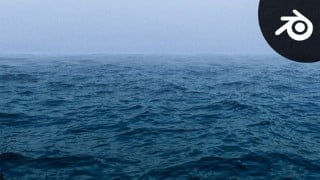

Learn how to create a realistic ocean in Blender without third-party tools. This course covers everything from studying real-life references to optimizing your render settings for faster results. Perfect for anyone interested in creating realistic 3D environments in Blender.
What you’ll learn
- How to create a realistic looking ocean using the ocean modifier in Blender
- How to create super realistic Water Shader procedurally
- How to add more atmospheric depth to your scenes
- How to optimize your Blender file for rendering and render huge scenes in no time
- How to composite your shots using the powerful Blender Compositor
Throughout this chapter, I’ll guide you through the different steps to create a realistic Ocean inside Blender, Blender only no third-party tools are needed, and all the project files and resources will available for you to download.
Here’s a brief summary of the different videos
Studying real-life references. It will be our guide to achieving a photorealistic result because it will allow us to recognize the main features that form oceans and water surfaces in general.
How to prepare Blender for the work we’ll be doing.
How to use the power of the Ocean modifier to create the surface of the water, and how to light your scene.
How to animate the oceans and make the waves move in a realistic way.
Create the camera animation for the scene.
How to fill the background with even more water surfaces to make the scene feel really huge and vast.
How to create a photorealistic look for our ocean.
How to create a photorealistic look for our ocean.
How to create a photorealistic look for our ocean.
In this video, we will take a bird-eye view of our entire shader, and how the different blocks work with each other to give a realistic-looking ocean.
Our ocean feels like shallow water, we want to give the illusion that it is very deep, and that’s exactly what we will be doing in this video.
Obviously, when we’re talking about a moody shot in the middle of the ocean it is important to create some fog.
In this video, you will learn how to break down any scene into different layers so that we’ll be able to render this scene in case our machines can’t render the entire scene all at once.
In this video, we will change different render settings to get the fastest renders possible.
In this video, we will learn how to render the sky on its own.
In this video, we will lay all the different elements on top of each other, and adjust them a little bit.
In this video, we will finalize the shot by adding some extra effects like vignette, lens distortion, chromatic aberration, etc…
Happy Blending.
Who this course is for:
- Anyone at any level interested in creating realistic 3D Environments in Blender
User Reviews
Be the first to review “Create Realistic Looking Oceans in Blender”
You must be logged in to post a review.



There are no reviews yet.