
Creative Color Variations in Photoshop

Learn iOS Design Guidelines, create design systems, and design for iPhone and iPad. Develop complex prototypes in Figma. Perfect for beginner UI/UX designers looking to enhance their iOS design skills.
What you’ll learn
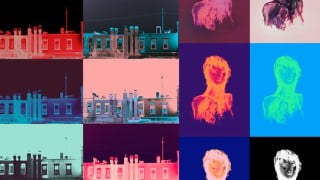
- Create multiple color variations from a single image in Photoshop
- Use Layer Comps to save and manage the state of layers and versions of the image
- Use Adjustment Layers such as Hue / Saturation and Gradient Map to manipulate color
- Understand and apply the principles of experimentation, iteration, editing and automation in the creative process
- Export your image variations using layer comps
This course will you teach you how to create multiple color variations from a single image, using Adobe Photoshop.
In this class you will learn:
how to save the state of your image using layer comps
how to manipulate color using adjustment layers (hue / saturation, gradient map, layer masks)
essential artistic concepts such as experimentation, iteration, automation and editing
the process of working with layers and color in Photoshop
how to export your image variations using layer comps
The course is structured in three sections:
Examples: I will go through some sample images (of different types including drawings, illustrations and 3D renders) that I have already created. We will look at the various layers in the .psd files and how they are used.
Photoshop features in depth: we’ll take a closer look at using layer comps and some useful keyboard shortcuts for working with images and color.
Demos: I will go through and narrate the process of creating new color variations from several different types (illustrations, photographs and ink drawings) of original artwork.
If you’d like to explore color and create beautiful series of works, influenced by Andy Warhol and psychedelic poster art, while deepening your Photoshop skills, this class is for you.
This class is intended for artists, photographers and designers or anyone interested in working with Photoshop.
Who this course is for:
- Photoshop users of all levels with an interest in color and design.
User Reviews
Be the first to review “Creative Color Variations in Photoshop”
You must be logged in to post a review.



There are no reviews yet.