
Design and Make A Memory Album with the Scan N Cut
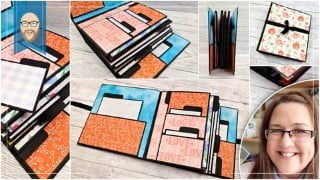

Learn how to use Canvas Workspace for PC and Brother Scan N Cut to design and create a memory album. Gain confidence with path tools and materials. Enroll today!
What you’ll learn
- Learn how to set up Canvas Workspace for PC to create accurate designs.
- Learn how to use the path tool in Canvas Workspace for PC effectively when designing cutting files.
- Learn how to use various additional functions in Canvas Workspace for PC to create cutting files.
- Learn how to construct a keepsake memory album.
It’s time to take your Scan N Cut creativity to the next level with this awesome memory album project.
Enrol today and join me, John Bloodworth, and mini book designer, Cal Summers, as we guide you step-by-step through using Canvas Workspace to design and create each element of the book from scratch and then show you how to assemble it!
With adaptable page styles, the opportunity to make it personal and plenty of space to store photos and sentiments from your special occasions, it is a project you will treasure forever.
Gain confidence with the path tool and path editing options in Canvas Workspace and expand your use of different materials with the Brother Scan N Cut as you design and construct your very own memory album – from scratch!
What You Will Learn
John Bloodworth, Gentleman Crafter will show you how to use a variety of features found in the free vector editing software, Canvas Workspace for PC, to design all of the elements needed to create this sturdy memory book that you can fill with photos and memories.
Cal Summers will then show you how to construct the album as you work your way through creating each elements of the project.
About You
The focus of this course is the project, rather than the technology and so it is likely that you’ve used your Scan N Cut machine for basic cuts and have dabbled in the companion software, Canvas Workspace, but you are looking for a way to bring this all together and build your creative confidence with a fun-to-make project.
If you need any basic tuition for either the Brother Scan N Cut or Canvas Workspace, please do check out my other courses – Cut, Draw and Scan with Confidence or Mastering Canvas Workspace – which are both also available on this website.
About Your Instructors
John Bloodworth, aka Gentleman Crafter, is a multi-award nominated arts and crafts professional and has been using and teaching the Brother Scan N Cut since it’s launch in 2013.
Cal Summers is a tea drinking, cat loving, mini book designer-maker and a Graphic 45 brand ambassador based in the UK. Cal teaches classes and hosts retreats teaching mini book making around the world!
It’s the perfect team!
What You Will Need
To make sure that you are fully informed before you choose to enrol, below is a quick list of the essential tools and materials that you will need in place to complete this project.
Tools
A Brother Scan N Cut Electronic Cutting Machine – any CM or SDX model can be used.
For CM Models you will need the following accessories – A Standard Cutting Mat, Standard Blade and Standard Blade Holder.
For SDX Models you will need the following accessories – A Standard Cutting Mat, Standard Autoblade and Autoblade Holder (Black Cap).
Access to a Desktop or Laptop Computer with a copy of Canvas Workspace for PC installed on it. Don’t forget to sign up for a free user account too!
Materials
Greyboard (600 Micron) 0.5mm thick – 6 Sheets. Greyboard is also known as ‘chipboard’ in some regions, it is basically an untreated thick cardboard.
30 Sheets of 12″ x 12″ 180 GSM / 65lb Cover Card.
40 Sheets of Double-Sided 12″ x 12″ Paper.
One Sheet of Tyvek Fabric 43GSM – A4 / US Letter Size.
Book-binding or Quick Tack PVA (White) Glue.
Other Awesome Benefits of Enrolling
As well as getting you confident with your Brother Scan N Cut machine some of the other great benefits of enrolling in this online course are:
Instant Access – No waiting for the postal service to deliver a DVD, a USB key or any other physical item. Enrol today, access straight away.
Ad Free – No waiting for the countdown timer on the ad to finish so you can skip to the content you want and no distracting ads popping up during your learning experience.
Book Marks/Notes – Tag sections of lectures and make notes as you study in lectures so that you can return to them easily in the future.
Q&A – Ask the tutors questions that are guaranteed a response.
Anytime/Anywhere – Online learning means that you can watch via a variety of devices, even your smart phone, so you can take me with you wherever you go.
Lifetime Access – Your one-time enrolment fee gives you LIFETIME ACCESS. No monthly fees. No extra charges. Start and stop when you like. Come back, go away, come back again. However you want to do it, we will still be there.
Enrol Today!
If this course is of interest to you, don’t wait, enrol today!
Who this course is for:
- The focus of this course is the project, rather than the technology and so it is highly recommended that you have at least used your machine to make basic cuts and that you have explored the tools in Canvas Workspace before you start this course.
- This course is for anyone that owns a Brother Scan N Cut that would like to learn through making.
User Reviews
Be the first to review “Design and Make A Memory Album with the Scan N Cut”
You must be logged in to post a review.




There are no reviews yet.