
Design Digital Planner Stickers On Your iPad

Learn PCB Design and Electronics Circuit with our comprehensive course. Gain expertise in schematic design, footprint creation, board designing, and more. Suitable for diploma holders, engineering graduates, and beginners interested in electronics. Enhance your skills and become an expert in PCB design and fabrication. Start your journey today!
What you’ll learn
- Learn how to create your own digital stickers for your digital planners from scratch
- Create Digital Stickers To Sell As Passive Income
- Create Handmade Digital Stickers For Digital Planning
- Procreate Tips & Tricks
Welcome All,
I’m Janna, by day analyst, by night digital designer.
I first came across digital planning a while ago and was intrigued how they are made and all the functionalities.
Procreate is a super useful and essential tool for anyone looking to start creating digital planners or even wanting to sell planners or stickers on places like Etsy where there is a huge market.
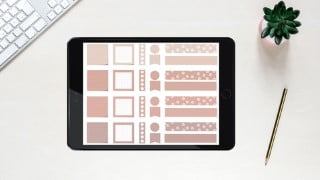
This class is will show you how to create fun and useful digital planner stickers for all your digital planning needs. Customise your planners with handmade stickers today!
Digital downloads are a perfect way to make extra income this year and I hope you can learn how to create your own stickers and sell these for passive income or to use in your own projects.
For this project you will need an iPad & Apple Pencil as well as the Procreate app.
This class will feature the following topics:
How To Create A Colour Palette
How To Create Notebook Stickers
How To Create Grid Stickers
How To Create To Do List Stickers
How To Create Shape Stickers
How To Create Washi Tape
How To Export Stickers
How To Import Stickers Into GoodNotes
I will provide some free basic stamp brushes and one lined paper brush you can use for this course to create some stickers but please do try and make these yourselves as it is a super simple process.
You can learn how to create Procreate Planner Brushes in my brush course, please have a look under my courses.
I would love to see what stickers everyone creates, please share your projects with me!
I hope you find this tutorial useful and thank you for taking the time to attend my class.
Please view my other classes around digital designing
Who this course is for:
- Beginners
- Everyone Interested In Digital Planning
- People who want to create a passive income business
- Anyone & everyone
User Reviews
Be the first to review “Design Digital Planner Stickers On Your iPad”
You must be logged in to post a review.




There are no reviews yet.