
Digital Portrait Drawing from Photo in Procreate
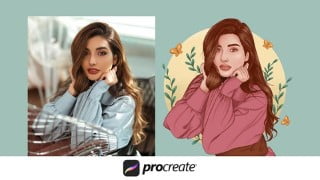

Learn the techniques to create attractive portrait illustrations using the iPad Pro and Apple Pencil. This course covers sketching, outlining, realistic hair, coloring, shadows, highlights, and adding backgrounds. Perfect for beginner and advanced illustrators looking to improve their digital drawing skills. No measurements needed, just choose an image or use your own photo. Suitable for hobbyists, artists, and anyone wanting to learn this illustration style. Join now and unleash your creativity!
What you’ll learn
- Practicing strokes.
- Practicing on Eyes, Nose, and Lips.
- How to sketch the subject that we have taken?
- How to outline the sketch?
- How we can make the hair look realistic?
- Coloring the subject.
- How to do the shadows and highlights to the subject?
- Finally, add the background to the illustration.
Sketching real people’s photos is such a fun and enjoyable activity. And adding the color element will take the illustration to a whole new level. Using the iPad Pro and the Apple Pencil. I’ll share my process for sketching the portrait and coloring it. With the skills gained from this course, you’ll be able to create an attractive portrait illustration for freelance work or your social media artist account.
In this course, you will learn the techniques to use while illustrating the portrait in a simple way. By utilizing this course you will learn how it will be easy to convert the photo into an attractive illustration. This course is for anyone who wants to learn to draw the portrait in an easy way without any need for measurements on the portrait in procreate.
What you’ll learn:
Practicing strokes.
Practicing on Eyes, Nose, and Lips.
How to sketch the subject that we have taken?
How to outline the sketch?
How we can make the hair look realistic?
Coloring the subject.
How to do the shadows and highlights to the subject?
Finally, add the background to the illustration.
Materials Needed:
iPad
Apple Pencil
Procreate App
To create an illustration:
You have to choose an image it can be anything. Or you can choose your own photo!
To avoid the blockage on inspiration use the website:
Unsplash
If you have any questions or suggestions. I’ll be here to help you, so please post your questions in a comment section and ask your doubts.
Who this course is for:
- Beginner Illustrators Who Would Love To Learn Digital Portrait Drawing
- Beginner Illustrators Who Curious About People Drawing
- Who Want To Begin In People’s Digital Drawings
- Advanced Students Who Want To Learn From A Real Professional
- For A Hobbyists Looking For A Learning New Skill About Digital Drawing
- Illustrators Who Are Struggling To Get Work Done
- Artists Have No Idea What To Create
- Artists Who Would Love To Learn The Same Illustration Style From This Course
- Beginners To Portrait Drawing Looking To Draw Professional & Eye Catching Characters
- People Who Have An iPad & Want To Learn How To Draw
- Illustrators Who Wants To Learn From Sketch To Draw
User Reviews
Be the first to review “Digital Portrait Drawing from Photo in Procreate”
You must be logged in to post a review.



There are no reviews yet.