
Drawing Funny Character In Photoshop Vol. 2

Enhance your productivity with our AutoCAD Electrical course. Gain a clear understanding of its features and capabilities, and learn to utilize specially developed electrical drafting tools. Perfect for students, teachers, beginners, and learners in the electrical field looking to expand their knowledge in designing. Join our lectures now!
What you’ll learn
- Understand the drawing art
- Draw funny characters
- Underestand fast shading of character face
- learn to be more creative in drawing
Hello, this course is one of the most interesting courses in the field of character design in Photoshop, and of course, people who want to use paper and pencil or any other design tool can use this course. Also, all people who use other software can benefit from the very useful content of this course.
In this fascinating training course, you will learn how to draw two characters in Photoshop
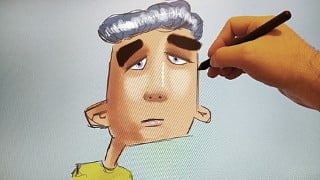
The characters created in this course will be completely colorful and will include drawing different elements of a face, nose, lips, ears, hair, mouth, clothes, and other components.
Each character will be drawn separately, and after drawing its lines, the steps of coloring and creating different shadows in different parts of the face and face components, as well as lighting will be done to make the characters more attractive and give a third dimension.
To make this course easier for you, I suggest that you do not start practicing the suggested methods like me or even by choosing a model for yourself, and practice too many times to become a master the character drawing in Photoshop.
In this training course, you will learn the following:
Create a character from the ground up with the help of simple design
Use color in the background
How to use different colors on the face and body of the created character
Lighting and creating shadows to make the character attractive
Draw the basic quick lines and draw the final fine lines of the design based on them to create the character
Making changes in the face of the created character and guiding it towards getting better and more beautiful what we design
I hope this course has valuable content for you and you can enjoy seeing it and add to your knowledge.
I will always answer your questions
These are the titles of the things you will learn in this course:
Character drawing 01
Character drawing 02
Character drawing 03
Character drawing 04
Do not forget to practice until you can become a professional master
Who this course is for:
- All people who are interested in art and drawing
- All people who want to enjoy drawing
- All people are looking for a powerful way to learn drawing
- All people are looking for a very simple way to draw
User Reviews
Be the first to review “Drawing Funny Character In Photoshop Vol. 2”
You must be logged in to post a review.





There are no reviews yet.