
Edit & Colour Grading Using DaVinci Resolve 17
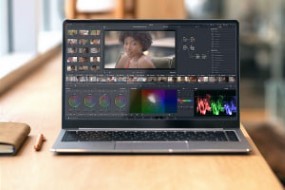

Learn video editing using DaVinci Resolve 17 and its main editing features such as colour correction and grading to make your post-production editing a breeze.
Video editing, colour correction, and motion graphics tools have a reputation for being frustrating to newcomers and to make life even harder, there are an unlimited number of alternatives. This free online video editing course will divide the information into smaller chunks to make it easier to understand and you will learn the ins and outs about the DaVinci Resolve 17 software including basic editing, colour correction, and grading.
What You Will Learn In This Free Course
Introduction to DaVinci Resolve 17
This module will walk you through the entire process from, opening DaVinci Resolve for the first time to exporting your first video. You will discover how to create and organize projects, import media into your project, edit pages, re-timing and more.
Basic Video Editing in DaVinci Resolve 17
This module will teach you the fundamentals of video editing in DaVinci Resolve 17. You will import media, spot your clips, add text and music, and finally export your project.; Module
Introduction To The Color Page of DaVinci Resolve 17
This module will focus on the colour page of DaVinci Resolve 17. You will see how the many tabs and buttons within it work without becoming overwhelmed.; Module
Color Correction and Grading in DaVinci Resolve 17
This module will teach you the basics of color correction and grading. You will learn how to create an aesthetically pleasing look for your footage and then adding creativity on top of it.; Module
Course assessment
User Reviews
Be the first to review “Edit & Colour Grading Using DaVinci Resolve 17”
You must be logged in to post a review.




There are no reviews yet.