
Free 3D Modeling Tutorial – Create a Ketchup Sauce Bottle in Blender
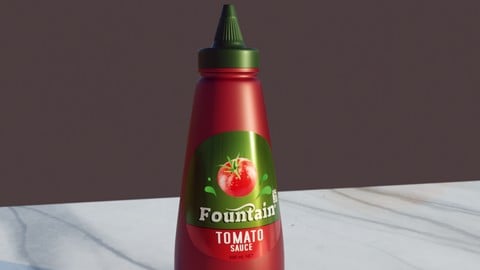

Hello all. I created a Blender tutorial for a sauce bottle. With labels, an opening and closing lid rig, and with shaders and lighting made in Blender’s real-time renderer Eevee.
One upside I always find working with tactile objects in your own home, that you can feel and see lighting effects from many angles, is a fantastic exercise to align your virtual creations with more believability and realism.
If there’s some appliance or random object in your own home you think is unique or interesting, why not give a go recreating it!
This sauce bottle is one I have in my pantry, and I always thought it was interesting. And I was curious to see if I could recreate the label with shaders and mesh without trying to rip the label off and scan. Or map the texture from a photo. Especially being such a reflective surface.
Here is the order of my workflow in creating this one:
Create the Nozzle – Using some mesh trickery, we can mimic the interesting nozzle design in this bottle’s lid
Create the Lid and Cap
Create the Bottle
Rig the Lid Twist Open Mechanism (With Bones and Shape Keys combined with Drivers)
Add the Brand Name to the Label
Bottle and Lid Materials
Extra Label Text
Final Bottle Brand Details
The Blender file is included to review. My hope is that it may inspire some ideas you can apply to your own projects, using this household asset as a solid benchmark to work within realistic boundaries.
Who this course is for:
- Those who want to see a complete 3D asset creation recorded and narrated. Observe the tools I use and in what way to reach a solution to different aspects of this unique Sauce Bottle.
- It may inspire or remind you of a few tools to use in your own projects. Which can save time or get a better result (or both!)
User Reviews
Be the first to review “Free 3D Modeling Tutorial – Create a Ketchup Sauce Bottle in Blender”
You must be logged in to post a review.




There are no reviews yet.