
Free 3D Modeling Tutorial – Model a Toy Car in Cinema 4D
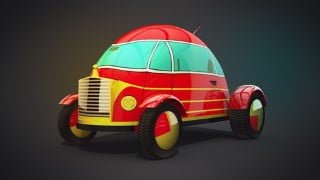

Learn how to model a toy car in Cinema 4D with this comprehensive course. From configuring viewports to post-production adjustments, master the art of 3D modeling and texturing. Perfect for 3D digital artists and Cinema 4D users. Enroll today!
Welcome to this course on modeling a toy car in Cinema 4D. In this series of lessons you will take your skills from beginner to intermediate in no time.
The topics that will be covered include the following:
Configuring viewports importing reference drawings, and scaling the drawings to the correct size.
3D Modeling
3D Modeling the car body, wind-up mechanism, wheels and bottom trim with parametric primitives, utilizing the make editable mode, modeling with points, and using the MoGraph Cloner for tire treads.
The use of the symmetry object and subdivision surface for an efficient workflow and smoother surfaces.
BP UV Edit, Texturing, and Lighting
Body Paint UV Edit, the paint set-up wizard, preparing the UV layout, projection methods, adding a sketch layout for reference.
Using the UV layout as reference to paint textures in Photoshop with the brush and pen tools.
Importing custom textures into Cinema 4D materials and refining their parameters; color, reflectance, etc. Refining the custom textures to they line up with the car geometry properly.
Creating a seamless environment in Cinema 4D using the floor and background tools.
Creating a 3-point light set-up and defining camera views.
Render Settings and Post-Production
Render settings: setting up ambient occlusion and global illumination effects, multi-pass layers and object buffers.
Post-production adjustments in Photoshop to enhance the final image.
Ready to learn how to model a toy car in Cinema 4D? Enroll today.
Who this course is for:
- 3D Digital Artists interested in learning about modeling basics and BP UV Edit in Cinema 4D
- Cinema 4D Users
User Reviews
Be the first to review “Free 3D Modeling Tutorial – Model a Toy Car in Cinema 4D”
You must be logged in to post a review.




There are no reviews yet.