
Free Photoshop Retouching Tutorial – High End Photo Retouching Tutorial with Frequency Separation
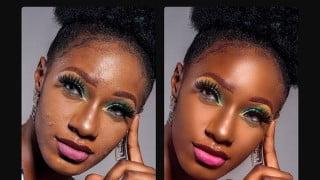

Learn how to retouch any picture in Photoshop with this comprehensive tutorial. Improve skin texture, correct shapes, enhance eye shadows and lips, reshape light impact, and enhance overall skin tone. Perfect for beginner and intermediate photographers, as well as anyone interested in photography and retouching. Practice and train your eyes to see colors, shapes, tones, symmetry, and depths. Download the tutorial file and follow along with your own high-quality picture. Start your journey to becoming a skilled photo retoucher today!
Hi and welcome to my photo retouching tutorial, in this tutorial you will learn how to retouch any picture in photoshop.
If you follow through the tutorial you will acquire some skills like
Frequency separation in a more simplified way,
How to use liquify to correct imperfect shapes, and
How to improve the contrast of the eye shadows and lips using curve tool, also
We will be using the dodge and burn tool to reshape the light impact on the face of the model and lastly,
We will use the colour grading tool to improve the overall skin tone.
To follow this tutorial step by step, I have attached a download link to the file I used. Kindly download the file and if you have your own high-quality picture, you can still follow along.
For the scope of this tutorial, I will like to emphasize a few points you should keep in mind
Skin texture: Skin texture is really key and if care is not taken you will lose the skin texture during frequency separation so this is my rule of thumb. Moderation is golden. Don’t go over the limit and make it simple.
If you want to be better at it, get your hands dirty. The more images you try to retouch, the better you will become. Remember practice makes perfect.
Train your eyes to see colours, shapes, tones, symmetry, depths and more. If you can see it you can create it.
Who this course is for:
- Beginner photographer
- Beginner photo retoucher
- intermediate photographer
- Anyone who wants to learn photography
- Anyone who wants to learn how to retouch using frequency separation
User Reviews
Be the first to review “Free Photoshop Retouching Tutorial – High End Photo Retouching Tutorial with Frequency Separation”
You must be logged in to post a review.



There are no reviews yet.