
Free Siemens TIA Portal Tutorial – TIA PORTAL Training Course
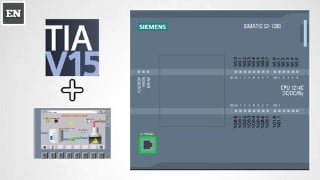

Learn the Basics to Advance Level SIEMENS TIA PORTAL Programming using Ladder Language. This course is perfect for Freshers, Industrial Professionals, and Experienced Automation Engineers. Develop your skills in PLC SCADA System with courses on WINCC Explorer, SIMATIC Manager, and Allen Bradly RSLOGIX 500 PLC. Gain knowledge in various topics such as program development, network configuration, logic instructions, timers, counters, arithmetic functions, troubleshooting, and more. Suitable for engineers seeking to enhance their automation expertise.
In this Course You will Learn the Basics to Advance Level SIEMENS TIA PORTAL Programming using Ladder Language. This Course is best for Freshers, Industrial Professionals and Experience Persons who are Working in the Field of Automation. As an Automation Engineer we have Develop Different Courses on PLC SCADA System. We have already have Course on WINCC Explorer, SIMATIC Manager, and Allen Bradly RSLOGIX 500 PLC.
Making Simple Program in TIA
Add remove PLC controllers IN TIA program
Going online with s7-300 plc via TIA
Connecting s7-300 via MPI/Profibus with PLCSIM
topology, network and device views
Upload /download program in PLCs
Working with different type of simulators like PLSIM and s7-plsim simulating modules
Integration of simulator with TIA and their offline control
Monitoring of plc program while online
Checking and setting the CPU /CONTROLLER and module properties
Create tags for the I/O of the CPU.
Create a simple network in your user program
Use the PLC tags in the tag table for addressing the instructions
Inserting new networks and deleting them
Adding empty box, open and close branch ass well as inserting inputs
Program blocks and main OB
Bit Logic Instructions NO,NC,COIL
Word Logic Operations ,AND ,OR NOT ,NAND, XOR,XNOR
Assignments and negative assignments
Set/reset coil with flipflops
Timers TP, TON ,TOFF and time accumulators
Counters UP,DOWN, UP/DOWN
Range and validity functions
Comparator Like equal to , not equal to ,less than, greater than etc(= ,> ,= ,<= )
Arithmetic Functions like add sub,MUL,DIV,MOD,NEG,INC,DEC,ABS ,MIN,MAX,LIMIT
MOVE Block FIELDREAD,FIELD WRITE etc
Advance Functions like SWAP,CONVERT ,CEIL,FLOOR
Special Functions
Plc tags and adding new tag table
Plc data types ,int ,float, double ,byte etc and how to add them
Plc trobl shooting and maintenance
Watch and force table and how to add them in project
Introduction to analog and digital sensors
Who this course is for:
- Engineers
User Reviews
Be the first to review “Free Siemens TIA Portal Tutorial – TIA PORTAL Training Course”
You must be logged in to post a review.



There are no reviews yet.