
Get Started with Apple Motion
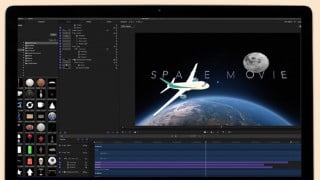

Learn the basics of Apple Motion 5 and create engaging 3D animations using the tools and assets within the software. Organize your projects, master keyframing, utilize lights and 3D cameras, and track objects. Perfect for beginner video editors and those looking to enhance their motion graphics skills.
What you’ll learn
- We will learn Motion Interface for new users
- Organising your motion project
- Working with 3D objects
- Basics of Keyframe Animation
- Lights to illuminate your scenes
- 3D camera setup and movement in Motion
In this class, we will explore the basics of Apple Motion 5 and create an engaging 3D animation using the tools and assets found within Apple Motion. I’ve been using Motion for the past few years and I am happy to share the tips and tricks I’ve acquired using Motion.
– We will go through the interface of Apple motion and learn the ins and outs of this software.
– It’s important to organize your project. We will go through best practices to keep your projects safe and SAVED in one place.
– Keyframing is at the core of any graphics sequence you have seen online or in films. We’ll go through the basics of Keyframing and learn by practicing 2D Animation. It’s gonna be fun trust me on this one 😉
– Lights make a huge difference when shooting a video or a film. Motion has inbuilt lights to enhance your 2D and 3D objects. Oh did I mention Motion comes with over 200 3d objects to work with FREE to use in your commercial projects.
– 3D Cameras inside of motion add a whole new level of perspectives when creating your sequences. Here we will develop our project using cameras inside of Motion. let’s have a great time using this. It’s my favorite feature of Motion.
– Hey we will also track objects using motion tracking. You can use this on your Youtube video and make text and objects follow a certain something ;P.
– Our Final Project will be epic. You will practice and create your final project. Trust me you’ll be excited to learn what you can do after your class.
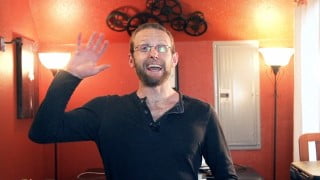
My name is Assad – I’m a YouTuber and a Video Content Producer working in Malaysia. I taught myself how to film and edit using Motion and Final Cut Pro X.
I often get questions from my clients asking for motion tips, so I thought I’d put this course together to show the basics of how Motions work and to hopefully help anyone interested in getting started with Apple Motion.
Who this course is for:
- Beginner video editor curious to dig deeper into the world of motion graphics. This course will introduce the structure of the Motion and how to work with its in built add on to finish you project.
- If you are thinking of migrating to Adobe after effects this can be a great introduction to your apple motion software.
- You have been editing in Final Cut Pro and would like to expand your portfolio to motion graphics.
- Anyone looking to improve their slide presentations. These tools and tips will give you an overview of what you can add to your current work slides
User Reviews
Be the first to review “Get Started with Apple Motion”
You must be logged in to post a review.


There are no reviews yet.