
Get the Most from Parallels Desktop
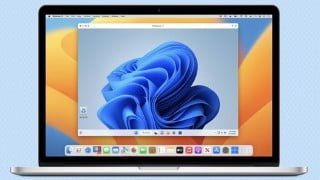

Learn how to install Windows 11 and Windows applications on your Mac using Parallels Desktop. Configure and fine-tune Parallels Desktop and Windows 11 to fit your needs. Discover the essential features of Parallels Desktop and run apps that are not available on Mac. Backup Windows 11 efficiently on your Mac. Suitable for Mac users who want to maximize their use of Parallels Desktop.
What you’ll learn
- See more of what Parallels Desktop can do for a Mac user
- After this course, you will be able to install Windows 11 and Windows applications on your Mac in Parallels Desktop
- After this course, you will be able to to configure Parallels Desktop and Windows 11 to fit your needs and your Mac
- After this course, you will be able to extend your backup process to efficiently backup Windows 11 on your Mac
This course focuses on the major features of Parallels Desktop that are essential to all users and the major settings you will want to fine tune to get the best use of Parallels Desktop.
The most important feature of Parallels Desktop hasn’t changed since its initial release almost 20 years ago: Parallels Desktop gives you the ability to run apps on your Mac that you wouldn’t otherwise be able to run. These apps that you will be able to run using Parallels Desktop include:
Windows apps, like Microsoft Access, that have no Mac version
Older Mac apps that can’t be run on the latest versions of macOS.
Popular Windows games like Age of Empires and PowerWash Simulator
Linux applications like GIMP and Inkscape
Parallels Desktop is now in its 18th major release, has hundreds of features, and it is used by millions of Mac users around the world. It has many features that will be essential to you, some of which you may have never even seen, but will want to use right after you see them. This course will help you identify the features that will be the most useful to you.
While the primary focus is running Windows in Parallels Desktop, running macOS inside Parallels Desktop is also covered in detail.
Whether you have just started evaluating the Parallels Desktop trial, or you have been using Parallels Desktop for a while now, this course will help you get the most out of your use of Parallels Desktop.
Who this course is for:
- Mac users who need to run Windows apps on their Mac
User Reviews
Be the first to review “Get the Most from Parallels Desktop”
You must be logged in to post a review.




There are no reviews yet.