
How to use 3d models for drawing in Clip studio paint

Learn basic surface modelling techniques for the Gulfstream G550 aircraft through Solidworks. This detailed course offers step-by-step tutorials, ensuring easy understanding. Perfect for beginners or those with upcoming projects. Gain confidence and become a skilled 3D modeler with Solidworks. Ideal for anyone interested in surface modelling. Use promo code GS-G550 for a discount!
What you’ll learn
- how to use the controls for the 3d models
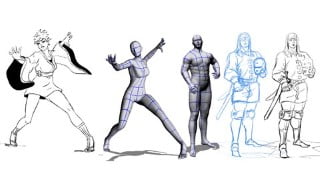
- how to draw using 3d models as reference or as a base to draw on top of
- how to pose 3d models
- how to make different body types that you can re-use in future illustrations
Are you looking to improve your digital art skills and streamline your workflow? Look no further! Our course, “How to use 3d models for drawing in Clip studio paint,” is here to teach you how to use the powerful 3D modeling tools in Clip Studio Paint to create dynamic characters and environments for your illustrations.
In this course, you’ll learn how to navigate the controls for the 3D models and camera, as well as how to create different body types and poses that you can reuse in your future projects. We’ll also show you how to design characters and create camera angles with the correct perspective and proportions.
We’ll cover topics such as posing 3D models, changing body types, adding light and shadow, incorporating external 3D models, and creating a 3D scene. Our comprehensive video tutorials and demos will give you a solid understanding of how to use 3D models to enhance your characters and backgrounds.
3D modeling is becoming increasingly essential for illustration, and this course will help you take your art to the next level. However, it’s important to note that this course focuses specifically on the 3D features in Clip Studio Paint and will not cover brushes or other tools. Therefore, we recommend having a basic understanding of the program before signing up.
Enroll now and start mastering the art of 3D model drawing in Clip Studio Paint!
Who this course is for:
- Digital artist who want to learn to use 3D models in clip studio paint
User Reviews
Be the first to review “How to use 3d models for drawing in Clip studio paint”
You must be logged in to post a review.





There are no reviews yet.