
How to Use Adobe Animate for Graphic Design
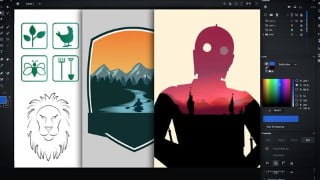

Learn how to create stunning vector graphics and designs with Adobe Animate. Perfect for designers and digital artists, this course covers everything you need to know about Animate’s powerful drawing and painting tools. Whether you’re new to design or looking to switch from Illustrator, this course will teach you how to create logos, icons, and more. Discover Animate’s capabilities as a graphic design tool and unleash your creativity. Ideal for those who want to learn vector art or explore an alternative to Illustrator. Start creating beautiful graphics today.
What you’ll learn
- You will learn how to create vector graphics
- You’ll learn all the drawing and painting tools in Animate
- You’ll learn how to create graphics for logo designs
- You’ll learn how to create icons
- You’ll also learn how to use advanced effects and gradients
Adobe Animate combines the power of Adobe Illustrator with the ease of Adobe Photoshop.
If you are a designer or digital artist looking for a quick and easy way to create vector art, this course is for you. You don’t need to learn Adobe Illustrator. This course will teach you everything you need to know about Adobe Animate in order to create stunning graphics and complex designs, easily. Adobe Animate is a powerful design tool and is much easier to grasp than Adobe Illustrator.
If you’re more familiar with Photoshop, and you find Illustrator to be complex and process-driven, then Animate offers you the best solution to create vector art.
And, if you are very comfortable with Adobe Illustrator, then this course will teach you how to switch over to Animate so that you can master the drawing and painting tools as a preliminary to learning motion design. Because in Adobe Animate you can sketch your ideas, design your artwork and animate it all in one program without having to export over to After Effects.
Adobe Animate can handle sketching, design, as well as animation. This class focusses on getting you up to speed with the design aspect of the software.
In this class you’ll learn everything you need to know how to make stunning and beautiful graphics for logo design, icon design, badges, posters and illustration.
First of all i’m going to give you an overview of the workspace and tools, and how to set up your workspace for designing. THen we’ll put to practical use all of the tools in 4 fun projects.
You’ll start out creating a super simple set of icons with simple shapes and lines.
Then you’ll develop slightly more complex work with 2 graphics for a logo.
In the 3rd project build an even more sophisticated and intricate graphic and learn how to use gradients and masks.
In the final project, you’ll get to recreate a beautiful movie poster based on an iconic design. This project will teach you how to make a double exposure effect as well as how to import bitmaps, use effects and blending modes.
Finally I’ll show you the capabilities that Animate has to handle type and to cusomtise your own unique fonts.
People often think of Adobe Animate has having 2 sides – it’s either either web development, or it’s Animation. But there’s a third, and powerful side to Animate – and that is it’s capability as a graphic design tool. I’m really excited to share this with you and to give you the option to create graphics quickly and easily.
Who this course is for:
- This course is for anyone who wants to learn how to create Vector Art
- This course is for Graphic Designers and Illustrators who want to learn how to use Animate
- This is course is for Photoshop users who want to learn an alternative app to Illustrator
User Reviews
Be the first to review “How to Use Adobe Animate for Graphic Design”
You must be logged in to post a review.



There are no reviews yet.