
Intro to Geometry Nodes using Blender 3.3
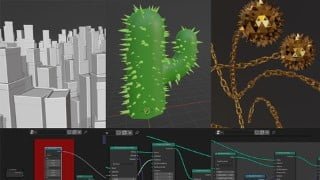

Learn Blender 3.3 Geometry Nodes and explore the exciting world of procedural systems. Suitable for beginners to advanced users, this course offers a soft introduction to coding and node-based workflows. Create stunning shapes and designs with step-by-step instructions and complete projects. Perfect for artists, teachers, and anyone wanting to enhance their Blender skills.
What you’ll learn
- Instance objects using Blender 3.3 Geometry Nodes
- Create, edit, and randomize custom attributes
- Interpret values using the Map Range node
- Rearrange nodes into organized networks
- Write a formula using multiple Vector Math nodes
Blender’s rise as a multi-purpose 3D application was especially noticable in 2019 with the release of version 2.8. Now several years later, Blender version 3.3 continues to explore and evolve one of the most exciting procedural systems; Geometry Nodes. As of November 2022, Geometry Nodes are a little over a year old, and each release is still considered a prototype. However, the developers consider it to be production-ready, and many users find it stable enough to incorporate into their pipeline.
Traditionally there exists a gap between digital artists and software developers. 3D art is indeed a visual medium, but Geometry Nodes provides a middle ground where one can dabble with code. I have taught this curriculum three times as a synchronous online class and after feedback from kids, teens, and adults, I am very proud of this carefully crafted learning experience. I found it was crucial to not overwhelm students with formulas, but rather create opportunities for seeing relationships between, numbers, code, and beautiful shapes.
CLASS FORMAT
This class contains 22 video lectures and 22 Blender scene files. Most of the Blender files are incomplete projects and students are given instructions on how to finish them. Some of the files only require a few clicks to complete. I find that focusing on specific tasks is more efficient for beginners rather than trying to digest the dozens of steps to complete a project. However, I do have a couple videos which walk students through creating something from scratch, but only after covering fundamental concepts.
PROJECTS
Instancing a City on a Grid
Instancing Needles on a Cactus
Instancing a Spiked Ball and Chain on a Curve
6 more exercises focusing on Utility Nodes like Vector Math and Map Range
Who this course is for:
- This class is suitable for Beginner to Advanced Blender users who want to learn Geometry Nodes
- Artists who want to a soft introduction to coding and node-based workflows
- Teachers who want to teach Blender Geometry Nodes
User Reviews
Be the first to review “Intro to Geometry Nodes using Blender 3.3”
You must be logged in to post a review.




There are no reviews yet.