
Learn Professional Game Art Logo and UI 6 Different Styles
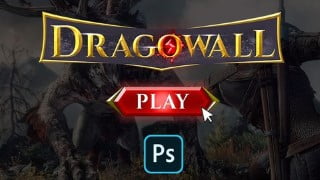

Learn how to create AAA game quality logos and graphic user interfaces in Photoshop. This course covers color theory, logo design for games, and various genres. Perfect for beginners with basic Photoshop knowledge. Ideal for indie game developers and those wanting to create their own game logos and GUIs. Gain in-depth understanding of color, animations, and layout from famous games. Resources included. Created by an experienced game artist. Optimize your use of Photoshop and unleash your creativity. Start creating awesome game artwork today!
What you’ll learn
- Creating Awesome Game Logo In photoshop
- Creating Best look and feel Graphic user interface
- Understanding Of colors
- Photoshop Layer styles and how to Achive what you want
- Understanding of which type of fonts to Use for your specific genre (Fonts Study)
- Shape language
- 3d logo Creation in photoshop
- Color balancing and filtering for the best output
Photoshop is a Tool which can help you converting your ideas into Successful Design. Exactly this course is created to convert your ideas into Actual art work, This course is Created for learners who want to learn how to create a AAA Game quality logo. In this course We are not only focusing on Photoshop options but you will also learn the theory about Logo Design for games, use of colors and much more in depth knowledge about various different genres.
Learn how to Create best Quality game logo design in Photoshop –
Learn how to use colors perfectly
Learn the fast workflow
Learn Basic theory of Design
Learn how to block out your Idea
learn What is shape language in games
Learn how to make beautiful game logo which represent your game !
What WE will Create –
AAA Rpg game Logo
AAA adventure rpg game GUI Buttons
Hyper casual game logo
Hyper casual game GUI Buttons
3d game logo Creation
Sci Fi game logo
Sci Fi game Graphic user interface
Important –
This course is designed for all levels which means you don’t need any previous knowledge about logo design ; only requirement is Photoshop with beginner level understanding of layers ,how to use layers and pen tool in Photoshop.
Work flow of Course –
this course will start from basic first we will learn about the theory of color. then Understanding the concept of all different types of logos and why they use different things in different ways. After understanding the theory we will start learning the Photoshop layer style basics. then we will start creating all 4 types of logos one by one with the perfect flow of understanding everything set by step.
We will do a in depth study of main menu and layout of Famous games to understanding the use of color and animations for highlighting Different important options in games. Then we will Create Graphic user interface buttons or GUI for games in photoshop we will cover all the diffrent options one by one in photo shop
At the end you will get all the resources too.
Creator – i am Creating game art and logos for more then 2 year for different types of companies and i have put all my knowledge inside this course which will help you creating your awesome work
Who this course is for:
- People who are whiling to learn Game art design
- useful for Indie game developer and who want to create their own Game Logo
- want to learn Game logo theory
- Who want to learn Game Graphic user interface creation
- Learn how to use photoshop in optimized way
User Reviews
Be the first to review “Learn Professional Game Art Logo and UI 6 Different Styles”
You must be logged in to post a review.



There are no reviews yet.