
Master Class of Skin, Face Retouching in Adobe Photoshop

Learn how to create stunning 3D visualizations in Photoshop with this course. Perfect for designers, architects, and students looking to improve their rendering skills and create high-quality renders for clients. Join Andre, an experienced Interior Architect, on this educational journey.
What you’ll learn
- you’ll learn everything you need to know about retouching faces and skin in Photoshop.
- We’ll start with the basics of retouching and work our way up to advanced techniques
- you’ll learn Removing blemishes, wrinkles, and other imperfections
- you’ll learn Smoothing skin without losing detail
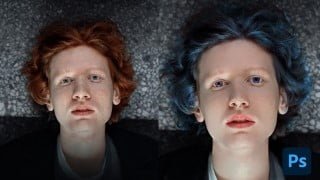
- you’ll learn Enhancing eyes, lips, change hair, eye color & other features
- you’ll learn Dramatic Editing Of Portraits
- A industry Standard Work flow of Skin Retouching
In this class, i will teach you basic techniques and process of Professional Skin Retouching & Portrait Editing, its use in different projects, and a streamlined workflow for Editing portraits for Fashion brands and Commercial use
Programs needed: Adobe Photoshop
The skill required: Beginner & intermediate photoshop skills
What You’ll Learn In this class I am revealing my secret of professional skin retouching and face editing for commercial and artistic purposes. I created a very easy technique of Face Retouching to get realistic Look in photoshop, without any professional skill requirements, the class is divided into a few parts from the introduction – Skin Retouching – Smooth Skin – Pimple Removing – Eye color – Hair color – Face modification – Speedup Action –
Throughout the course, you’ll learn how to use a variety of tools and techniques in Photoshop to retouch faces and skin,
We’ll cover topics such as:
Removing blemishes, wrinkles, and other imperfections
Smoothing skin Retouching without losing detail
Whitening teeth and eyes
Enhancing eyes, lips, and other features
Working with different skin tones
Creating a natural and polished final result
Professional Skin Retouching workflow
Retouching Action
Face Modifications
Hair Color change
Eye Color Change
Face Skin tone
By the end of the course, you’ll have the knowledge and skills to create professional-quality retouching on your own, you’ll have enough Photo Editing skills you can use for any number of projects, such as Photography exhibits, posters, album arts, and commercial use
feel free to ask any questions.
you can also follow me and visit my profile for resources
Agency Portfolio • instagram • Linkedin • Behance
Who this course is for:
- Whether you’re a professional photographer, Content Creator, Influencer or a makeup artist, or a hobbyist, this course will help you take your retouching skills to the next level.
User Reviews
Be the first to review “Master Class of Skin, Face Retouching in Adobe Photoshop”
You must be logged in to post a review.





There are no reviews yet.