
Masterclass introduction to Wondershare Filmora 11
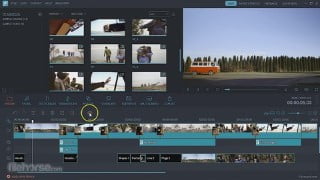

Learn video editing with Wondershare Filmora! This comprehensive course covers everything from basic editing to advanced techniques like color grading and motion tracking. Perfect for beginners and intermediate students, you’ll gain the skills to import, edit, and export videos with ease. With instant templates and expert instruction, you’ll be creating professional-looking videos in no time. Start your editing journey today and unlock the power of Wondershare Filmora!
What you’ll learn
- Learn all the Tabs and Uses in Wondershare Filmora 11
- Learn how to trim some parts of a video
- Learn how to delete some parts of a video
- Learn Color grading of a video/clip
- Learn how to add text in a video ( Introduction and Outro)
- Learn how to animate text (Text animation)
- Learn how to edit video( add exposure/brightness and other important features)
- Learn how to save and Export videos
- Learn how to import videos
- Learn how to add voices in a clip (adding Voice over)
- LeLearn how to record screen
- Learn how to edit a video (with practical)
- Learn how to use green screen/chroma (beginner level)
- Learn how to crop/zoom, pan and zoom
Show moreShow less
This course is constantly being revised and updated with new lessons.
Learn video editing with Filmora!
Edit like a pro!
Have you ever wanted to edit your own videos but were too intimidated by all the editing programs out there? There are plenty of programs to choose from, but hardly any of them make editing easier for beginners. With Filmora, you can easily edit your clips with minimal effort. The program is designed for everyone, meaning that you can use it even if you have no knowledge about video editing! With instant templates, your videos are just a few clicks away from being perfect! By providing both basic and advanced tools, Filmora is the perfect place to start if you’re looking to become an editor!
In this course, we’re going to go through this amazing program and learn about every part of it. From audio design to cinematic color grading, you’ll learn everything about professional editing and with some practice you’ll become an editor too!
Our instructor has years of experience not only in video editing, but also in teaching, and the expertly-crafted syllabus is designed to be easy to follow and thorough. You will learn how to make your videos great with on screen examples and resources for you to follow and improve. That’s why this is the only Filmora course you’ll ever need to create professional and great looking videos!
Start creating and editing your own videos today!
After taking this course, you will be able to:
Import, edit, and export your videos
Do screen recordings
Do text transitions and effects
Do audio design for your videos
Make video transitions and add effects
Do masking, motion tracking, and color grading
Include stickers and graphics to your videos
Who this course is for:
- Beginner and intermediate students in video editing (Wondershare Filmora)
- Anyone curios about the power of Wondershare filmora
User Reviews
Be the first to review “Masterclass introduction to Wondershare Filmora 11”
You must be logged in to post a review.



There are no reviews yet.