
Painterly retouching with Photoshop. Fine Art Photography.
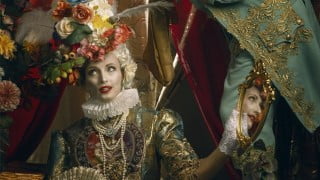

Learn the art of fine art retouching in digital photography with this course. Improve your Photoshop skills and create stunning painterly portraits. Gain a solid workflow and time-saving techniques to produce professional-level work. Perfect for digital artists, photographers, and designers looking to enhance their skills and achieve a classical, painterly look. Lifetime access to this continually updated course and its digital assets. Download project materials or use your own. Simplify your retouching process and take your creativity to the next level.
What you’ll learn
- Fine Art retouching in digital photography
- Creating Painterly look in Portraits
- Creative and unique way of retouching portraits
- Creating digital art that attract clients
- Classical painting look in digital photography
This course is continually updated, and future new projects and new Photoshop compositing techniques will be added ongoingly.
In this course, we will be retouching Fine Art Baroque style portraits. This course focus on efficient retouching in a painterly style, and techniques, that will help you create your own digital art, that stands out.
The structure of this course is based on several years of experience in teaching online students. For only a one-time fee you can get Lifetime access to this growing course and its digital assets.
What Will I Learn?
Simple, solid workflow in retouching portraits.
Improve your photoshop skills and techniques to a professional level.
Learn how to optimize your workflow and produce mastery-level work in the shortest time possible.
How to archive paint a like look in your photos.
This course is designed to be hands-on, and project-based with more projects being added on a continuous basis. All of them will include project materials, but you can always use your own.
What are the requirements?
Mac or PC with Adobe Photoshop (CC preferable) installed.
Access to digital assets of this course. Download them.
Basic knowledge of Photoshop principles.
What am I going to get from this course?
Learn concepts of retouching
Recommended workflow
Gain an excellent general knowledge of how to blend different components together in Photoshop
Simple but effective and time-saving techniques
How to create professional fine art portraits
What is the target audience?
Digital artists who want to improve their skills in Photoshop
Photographers with a creative soul
Artists who want to take the next step in becoming professional
Those who want to simplify their retouching process
Hobbyists or professionals looking for their next creative challenge and personal growth
Who this course is for:
- Digital artists, hobbies and professional editors, photographers, designers.
- Artists who interested to uplift their skill to the classical, painterly look
User Reviews
Be the first to review “Painterly retouching with Photoshop. Fine Art Photography.”
You must be logged in to post a review.



There are no reviews yet.