
PaloAlto Panorama- Firewall & Log Management v10.1.x
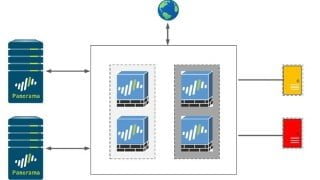

Learn about Palo Alto’s Panorama, a central device and log management solution for Palo Alto products. Ideal for network security teams and administrators.
What you’ll learn
- Introduction to Panorama, key features, Panorama Modes
- Panorama Deployment options i.e. Physical, virtual and cloud based appliances
- Palo Alto License types and how to license Panorama
- Device and Firewall management using Panorama Device Groups and Templates including template variables
- Firewall log forwarding to Panorama, including traffic, system, configuration etc.
- Log management using Panorama log collector feature
- Panorama High Availability and failover testing
- Panorama User Administration using Role Based Access Control
- Troubleshoot commons issues and useful commands
- Upgrade Panorama standalone appliance as well as Panorama cluster
- Firewall Upgrade using Panorama
- Types of Panorama Configurations
- Types of Panorama Commits
- Panorama Operations for configuration management
- Panorama manual and scheduled backups
- Onboard locally managed firewall into Panorama for central management
- Remove Panorama Managed Firewall for local management
Show moreShow less
Palo Alto is a leading Network Security vendor providing next generation Firewalls and other products. Panorama is an offering of Palo Alto for central device and log management of the various Palo Alto products. In this course, we will cover –
1. Panorama’s key features, the 3 Panorama modes, deployment options and licensing the Panorama
2. Onboard 4 x Firewalls onto Panorama and then use Panorama features like device groups, templates, template stacks and template variables to build 2 DCs with 2 firewalls in each
3. Understand the Pre and Post rule base on Panorama and how to use those for policy management of managed firewall
4. HA pre-requisites and how to setup Panorama HA across 2 appliances
5. Software upgrade of Standalone Panorama as well as Panorama HA cluster
6. Upgrading managed firewall from Panorama
7. Onboard locally managed firewall into Panorama for central management
8. Remove Panorama managed firewall for local firewall management keeping the Panorama pushed configurations
9. Use of Panorama for Log Management and how to setup Panorama as a local Log collector
10. Configuring the managed firewalls to forward various types of logs like traffic logs, system logs to Panorama
11. Role Based Access Control to Panorama appliance using the dynamic and custom roles to provide different access for different set of users
12. Common issues and ways to troubleshoot along with some useful tips
The course will comprise of theory and lab sessions to cover the above topics wherever possible and applicable
Who this course is for:
- Panorama Administrators
- IT Security Teams
- Network Security Team
- SOC teams
- Palo Alto Administrators
- Network Team
- Anyone else who want to learn about Palo Alto’s Panorama Product and functionality and working
User Reviews
Be the first to review “PaloAlto Panorama- Firewall & Log Management v10.1.x”
You must be logged in to post a review.



There are no reviews yet.