
Poolrooms in Blender – step by step – (beginner friendly)
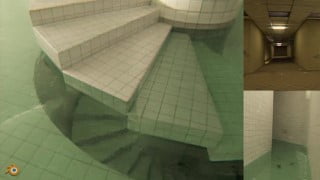

Learn how to create realistic 3D animations in Blender with this detailed tutorial. From modeling to lighting, get all the essential skills needed.
What you’ll learn
- I will teach you the basics of Blender as well as some advanced options.
- I will teach you how to create the animation you can see in the introductory video from start to finish.
- I will show you how to model poolroom mazes of different shapes non-destructively so that we can easily change the construction later.
- I will teach you how to create realistic materials in Blender
- I will show you how to create realistic camera movements, and how to add a lot of details and imperfections.
- I will teach you how to create realistic lighting
As you know, I previously recorded a 4-hour tutorial on how to create Backrooms in Blender. A lot of people watched the tutorial, and some of them asked if I could make a tutorial on Poolrooms, so, why not.
I did some searching on Youtube and there aren’t as many Poolrooms videos as there are Backrooms videos, but they are watched a lot, I haven’t found any tutorials on how to create Poolrooms, so this one, if not the first, will definitely be the most detailed.
In this tutorial, we’ll create the animation which you can see in the introductory video. The tutorial will be adapted for beginners, but we will also go in-depth to get as many details as possible.
I will show you how to model poolroom mazes of different shapes non-destructively so that we can easily change the construction later.
We will create and animate realistic water and other materials and show you how to get caustics without slowing down render time.
We will create daylight lighting for open spaces with windows and lighting for closed spaces.
I will show you how to create realistic camera movements, and how to add a lot of details and imperfections.
In post-processing, we’ll get an authentic VHS look with the new details I’ve learned for this tutorial.
Who this course is for:
- Those who want to learn how to create realistic 3d animations in the free program Blender
User Reviews
Be the first to review “Poolrooms in Blender – step by step – (beginner friendly)”
You must be logged in to post a review.



There are no reviews yet.