
PremierePro 2020 | Introduction to professional editing
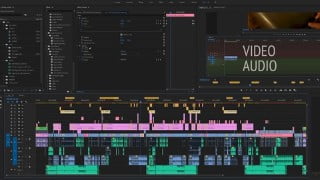

Learn professional video editing with Premiere Pro 2020 in just 30 minutes. This course offers comprehensive guidance, tips, and tricks to create stunning videos. Suitable for beginners and creative editing enthusiasts, gain expertise quickly on both Windows and Mac operating systems. Start making visually appealing videos today!
What you’ll learn
- Premiere Pro 2020 – in 30 minutes – introduction to all aspects of professional video editing
- Practice video material included – about 30 minutes of practice.
Hi, this is Nico from Einstellungssache. In this video series I will show you all our learnings and tricks, that we have collected over the years in post-production, to help you create professional looking videos.
Regardless of whether you are looking for answers in a specific subject, you want to increase your efficiency, or you just started working on your very first project – this is the right place. I will provide you with explanations, exercises, tips and tricks and content for download. That’s how you will gain the most expertise in dealing with Premiere in a short amount of time.
In this course we will be discussing the fundamental settings and approaches for your first project.
This tutorial is for Windows and Mac. All shortcuts will be displayed for both operating systems.
Who this course is for:
- Creative editing amateurs willing to learn the process of making good-looking videos
User Reviews
Be the first to review “PremierePro 2020 | Introduction to professional editing”
You must be logged in to post a review.



There are no reviews yet.