
Procreate – Learn to Create Stitch & Sequin Brushes
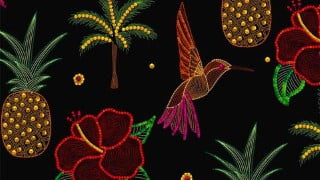

Learn AutoCAD commands and tools to create and edit drawings, plans, and layouts. Change from 2D to 3D, use 3D tools, and explore AutoCAD 2022 features. This course is suitable for engineers, architects, and beginners. Includes detailed explanations, real-world examples, practice drawings, and quizzes. Improve your drafting skills and stay updated with the latest AutoCAD version. Start learning now!
What you’ll learn
- Create Embroidery Stitch Brushes in Procreate
- Creating Prints for Surface Pattern Design with Embroidery Brushes
- Techniques you can apply while creating any procreate brushes of your choice!
- By the end of this class, you’ll have created a professional-quality Procreate Brushes that you can sell online or use to create art prints
This class is about creating Stitch Brushes & Sequin Brushes for Digital Embroidery in the drawing app Procreate on your Ipad.
Following are the type of stitche brushes we’ll learn to create in the class:
Running Stitch
Blanket Stitch
Feather Stitch
Chevron Stitch
Lazy Daisy Stitch
Sequin Brushes
There are bonus class showing how to use these brushes to create prints and patterns:
1. Sea Animals Pattern
2. Insects Pattern
3. Leopard Artprint
4. Toucan Seamless Pattern
5. Tropical Motifs
These Stitch Brushes can be used in many ways, here are few examples:
1. Surface Pattern Designs
2. Selling Brushes Online
3. Illustrating Prints And Motifs
4. These prints can be licensed to companies or uploaded on print on demand sites
In this class you’ll learn how to:
– Create more than 6 Embroidery Stitch Brushes in Procreate
– Create Sequins Brushes in Procreate
– Creating Prints for Surface Pattern Design with Embroidery Brushes
– Techniques you can apply while creating any procreate brushes of your choice!
Who this class is for:
Beginners & Intermediate Level: Anyone who knows the basics of Procreate
My drawing tools:
11-inch iPad Pro (@nd Gen)
Apple Pencil (2nd Gen)
Procreate, Drawing App
You’ll need:
An iPad
The drawing app, Procreate
An Apple Pencil or other stylus
By the end of this class, you’ll have created a professional-quality Procreate Brushes that you can sell on online platforms or on your website or create art and prints with these brushes.
For your project you can create any Embroidery Stitch Brushes of your choice following the techniques shown in this class!
Following are list of few more Embroidery Stitch Brushes that can help you decide on your project:
1. Chain Stitch
2. Feather Stitch
3. Cross Stitch
4. French Knot Stitch
5. Star Stitch
6. Satin Stitch
Who this course is for:
- Beginner & Intermediate Level
User Reviews
Be the first to review “Procreate – Learn to Create Stitch & Sequin Brushes”
You must be logged in to post a review.




There are no reviews yet.