
Revit Architectural: Work with Live Villa Project
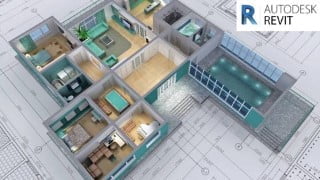

Learn Autodesk Revit Architecture and become proficient in BIM design, modeling, and 3D visualization. Create your own projects and master the Revit user interface. Ideal for architects, engineers, designers, and construction professionals. Start your career in BIM today!
What you’ll learn
- Introduction To Revit Architecture
- Detailed Discussion On Revit User Interface
- Using Architectural Tools in Revit
- Different Component Creation In Revit
- Modeling Different Wall In Revit
- Modeling Different Shapes Of Roofs And Ceilings
- Modify & Opening Options In Revit
- Modeling Different Staircase And Railing
- Discussion On Live Project To Understand About BIM
- Discussion On Revit Project Workflow
- Discussion On Room And Area Options In Revit
- Preparation Of Working Drawings In Revit
- Preparation Of Schedule In Revit
- Starting Residential Villa Project In Revit
- Importing Autocad Architecture Plan Into Revit model
- Starting Modeling Of Project – Cad To BIM
- Interior Design Of Bedroom In Villa project
- Complete Modeling Of Villa Project
- Rendering Of Project Using Revit Rendering techniques
- Creation Of Walk Throughs And Animations in Revit for Client Presentation
Show moreShow less
Major highlights of the course
Navigate Autodesk Revit Design Interface.
Discussion On Autodesk Revit Design Commands.
Discussion On Building Envelope (Cutout) Design.
Discussion On Interior Design.
Understand Concepts In Revit 3D Modeling.
Understand the Preparation Of 3D Models and Designs In Revit.
Discussion On Revit Rendering.
Creation Of Walk Through & Animation.
We assure you will be able to get 50% tool-based learning & 50% Real-time Experience-based learning.
A few Highlights of this course:
Create your own 3d projects from scratch to end within a few hours
Be comfortable finding your way around the Revit User interface
Provide the foundation for starting a career in BIM Designing, Modeling, and 3D visualization.
Create your own components, models, and materials in Revit
Create components, Models of Villa including bedroom, hall, kitchen, toilets, and AEC industry model
What I this course all about?
Autodesk Revit is a building information modeling (BIM) software tool for architects, landscape architects, structural engineers, mechanical, electrical, and plumbing engineers, designers, and contractors. In this Revit Architecture course, you will learn how to use Revit Architecture to create 3D models and produce working drawings, creating virtual walkthroughs and animations of buildings for your architectural presentation. Starting out with the basic concepts of BIM working within the 3D environment of Revit, we will start with setting out the building constraints, before working through the different modeling, annotation, and documentation tools available within Revit.
This course is designed and delivered by industry experts. You can kickstart your Revit Journey, wherein we take you Step by Step with Real-Life Projects and get you up & running to design your favorite design, model, and graphics efficiently, quickly, and in the right way.
Comprehensive coverage of the essential tools to design a space, components, Residential villa with bedroom, hall kitchen, toilet models, elevations, walkthroughs & animations. You will learn not only how every tool works but also how to apply it in the right way in your Revit workflow. Exercise files like Revit 3D Models for every lecture & section so you can follow along step by step included in this course.
Real-life work examples were included in this course so, you will be able to directly work also in any company/industry. To check the understanding level quizzes were provided at the end of every section. No matter whether you are a Beginner, Intermediate, or in an Advance level candidate this course teaches you everything and clears your doubts.
Project-oriented course
The course lessons are mostly project-oriented and most of the tools and commands are taught with their real-world applications. Each module ends with a practical question that is related to the course and students are encouraged to answer the questions before moving further.
Quizzes and Drawings for practice
To check the understanding level quizzes were provided at the end of every section. And also drawings were provided for practice purposes.Course Instructor
Ms. Priya narwal
Architect in Haryana
Expert in CAD, REVIT, V-Ray, and 3DS MAX | 2D renders in photoshop | 3D realistic renders in 3ds max and
V-ray | Realistic walkthroughs | Project Management and handling of clients.
Instructor support for questions
We understand that students will have questions related to the course and it’s necessary also for a healthy learning process hence we encourage students to ask their questions related to the course in the Q&A section of the course. We answer each and every question as soon as possible and so far we have answered every single course-related question from students in the Udemy Q&A section.
If you are still thinking about whether you should enroll or not then we encourage you to watch some of the preview videos and test the waters before you actually enroll in the course.
Who this course is for:
- People who want to start career in Building Information Modeling (BIM)
- Civil Engineers
- Architects
- Designers
- Space Planner
- Interior designers
- Furniture designers
- Modelers
- Beginner to Advanced Revit Users
- Construction Professionals
- Anyone with an interest in 3D design , modeling in Revit
User Reviews
Be the first to review “Revit Architectural: Work with Live Villa Project”
You must be logged in to post a review.





There are no reviews yet.