
Creo 2.0 SheetMetal design
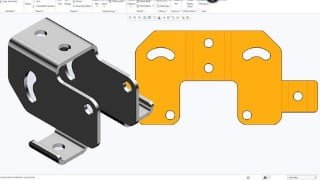

Learn sheet metal modeling in Creo with this comprehensive course. Explore the design process, model creation, and calculation methods. Master primary and secondary wall features, bend relief, flat patterns, and more. Discover sheet metal design properties and their settings to automate tasks and maintain design consistency. Ideal for Creo designers and modelers. Start your sheet metal design journey today!
What you’ll learn
- Creo
- Sheet Metal Modeling In Creo
In this course, you will learn
The sheet metal design process
Sheetmetal model creation, conversion, and display
Methods of developed length calculation
Primary wall features
Secondary wall features
Partial walls
Bend relief
Unbend and bend back features
Sheetmetal bend features
Flat patterns
Sheetmetal cuts
Forms
Notch and punch features
Sheetmetal environment setup
Sheetmetal design Information tools
Sheetmetal design rules
Detailing sheetmetal designs
Topics Covered:
1: Introduction to the Creo Parametric Sheetmetal Design Process
2: Sheetmetal Model Fundamentals
3: Creating Primary Sheetmetal Wall Features
4: Creating Secondary Sheetmetal Wall Features
5: Bending and Unbending Sheetmetal Models
6: Modifying Sheetmetal Models
7: Sheetmetal Setup and Tools
8: Detailing Sheetmetal Designs
About Sheetmetal Design Properties
Sheet metal properties and their associated settings can be used to predefine common feature geometry, automate tasks, and maintain design consistency for sheet metal parts. The values of these settings depend on any predefined sheet metal parameters. The following properties specific to sheet metal are available in the Sheetmetal section of the Model Properties dialogue box:
• Bend Allowance—Displays the factor type for bend allowance calculations and whether a bend table is assigned to the model.
• Bends—Displays the radius size and the location for dimensioning bends.
• Relief—Displays the type of bend and corner relief.
• Edge Treatment—Displays the type of edge treatment.
• Miter Cuts—Displays the width and offset of miter cuts.
• Fixed Geometry—Displays the part geometry to remain fixed during unbend, bend back, and flat pattern operations.
• Bend Order—Displays the number of bend order sequences defined for a model.
• Design Rules—Displays the number of design rules defined for a model.
• Flat State Instances—Displays the number of flat state instances defined for a generic model created in legacy releases older than Creo Parametric
Who this course is for:
- Creo Designers and Modelers
User Reviews
Be the first to review “Creo 2.0 SheetMetal design”
You must be logged in to post a review.




There are no reviews yet.